
If you’re new to Excel, you’ve probably heard of Workbook and Worksheet, and you might be wondering, aren’t they the same thing? While they’re closely related to each other, they’re not the same. Whether you’re a beginner or brushing up on your skills, mastering the Excel workbook and worksheet is the foundation for efficient data management. In this guide, you’ll not only learn the key differences between a workbook and a worksheet, but also how to link them together to build dynamic, interconnected spreadsheets that save time and reduce errors.
What is an Excel Workbook?
- A Workbook is the entire Excel file that can have many worksheet tabs inside it.
- For Example, when you save an Excel file Sales_Report_2024.xlsx, you’re saving the entire workbook, including all the data, formulas, charts, and Worksheets it contains.
- Think of a workbook as a book that contains all the worksheets.
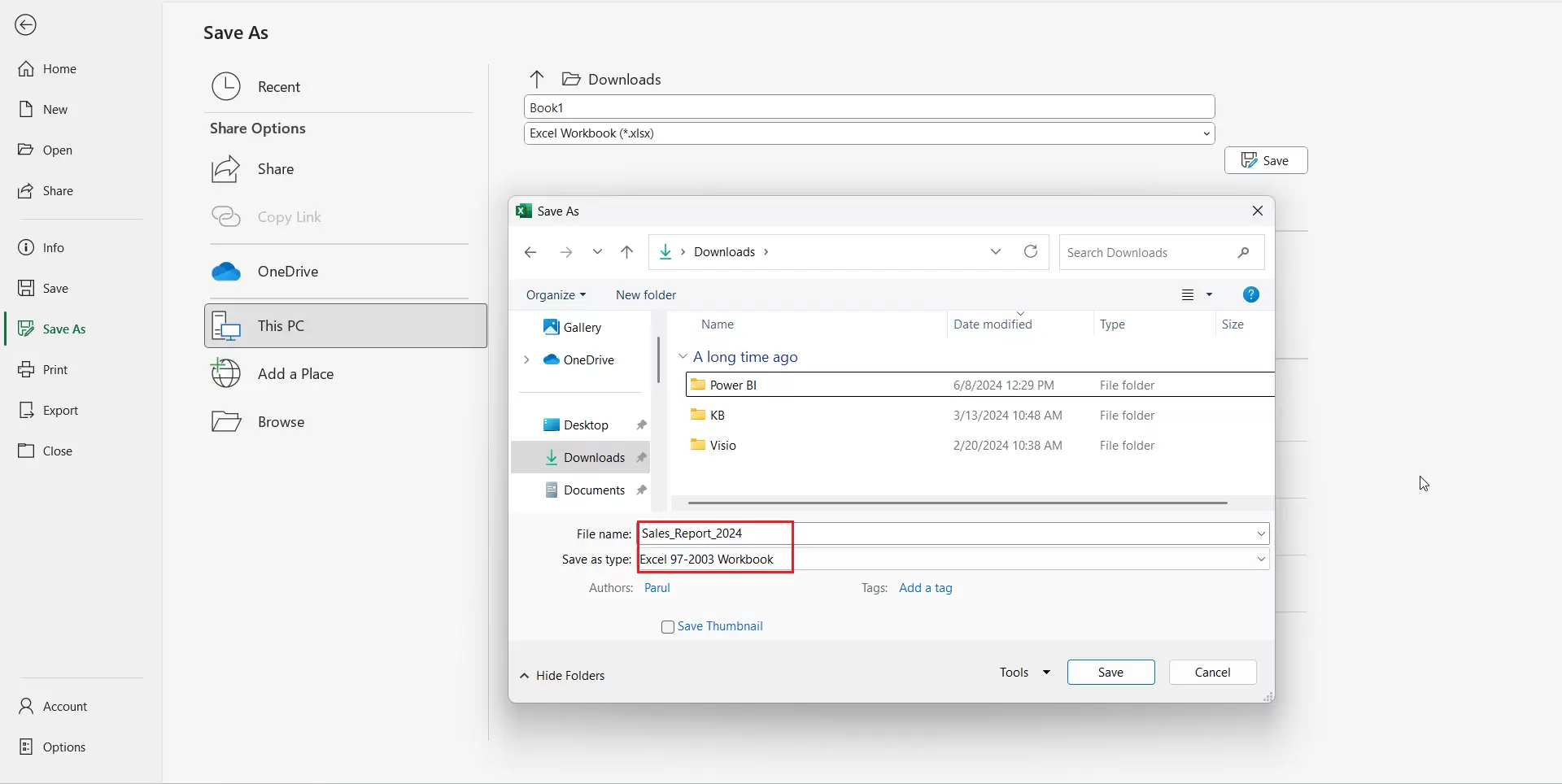
Key Features of an Excel Workbook
- It contains one or more worksheet tabs within it.
- It ends with a .xlsx or .xls file extension.
- It can be shared, emailed, or uploaded as a file.
Workbook Example (Practical Use Case)

- Let’s say you’re building a Sales tracker. You might structure it like this:-
- Workbook Name: Sales_Report_2024.xlsx
- Worksheets Inside: Jan, Feb, Mar, Total Summary
- By splitting the data into multiple Worksheets data is organized according to relevance, and it is easy to interpret and analyze.
What is an Excel Worksheet?
- A Worksheet is a single tab or sheet inside the workbook, where you can input and analyze the data.
- Each worksheet is made up of rows and columns that form cells, where all the data is entered, from text to formulas.
- By default, whenever you open a new Excel file, you start with only one worksheet, with the name Sheet1.
- A worksheet is a single sheet in an Excel book.
Key Features of an Excel Worksheet
- It has rows and columns that look like a grid.
- It can be renamed, deleted, copied, or moved from one location to another.
- It can store tables, charts, formulas, and visuals.
Workbook vs Worksheet: Key Differences
| Feature | Workbook | Worksheet |
| Definition | It is the whole Excel file | It is a single sheet inside the Excel file |
| Contains | One or more worksheets | Cells (rows and columns) |
| File Type | .xlsx, .xls | Not saved individually |
| Example | Sales_Report_2024.xlsx | Tabs: “Jan”, “Feb”, “March”, “Annual Summary” |
How to Link Worksheets in Excel
Linking worksheets in Excel is a powerful way to keep your data connected so that updates in one sheet automatically reflect in another. Worksheets can be linked in Excel to create a Dynamic Report by using formulas.
Linking Worksheets Within the Same Workbook
- Open your Excel workbook with multiple worksheets.
- Go to the cell where you want the linked data to appear.
- Type = (equals to sign).
- Then navigate to the other worksheet (click the worksheet tab at the bottom).
- Select the cell you want to link.
Linking Worksheets Across Different Workbooks
You can also link to a different Excel workbook:
- Open both workbooks.
- In the destination workbook, type = (equals to sign), then switch to the other workbook and select the cell.
- Press Enter.
Example of Linked Worksheets
Below is an example of linking within the same Workbook:
- =Jan!B2+Feb!B2+March!B2.
- This formula adds the value in cell B2 in the Worksheet Annual Summary from the Jan, Feb, and MarchWorksheets.
- The formula is visible in the Formula Bar.
Summary
- A Workbook is like a book, and each page inside this Workbook is a Worksheet.
- You can store multiple worksheets inside one workbook to organize related data.
- A worksheet is a single spreadsheet within a workbook where data is entered and analyzed.
To explore all our posts covering the fundamentals of Excel, please follow this link.